ggobook LOCAL COMPUTING

GO CODE. A NOTEBOOK. YOUR COMPUTER.

A little room
to think in Go.

Try an idea. Keep the code, notes, and results together. GoBook brings Go experiments into a local browser workspace.

Early release · v0.8.1 · Open source

FIRST EXPERIMENT01 / 02

A small question. An answer you can inspect.

// Your first Go cells
amounts := []float64{10, 20, 30}

total := 0.0
for _, amount := range amounts {
    total += amount
}
fmt.Println(total)
OUTPUT60Calculated locally when you run it.
Download this notebook
Real Go, local executionRetained interactive cellsVersioned module support in Native mode

MEET YOUR WORKSPACE

Keep the thought
beside the result.

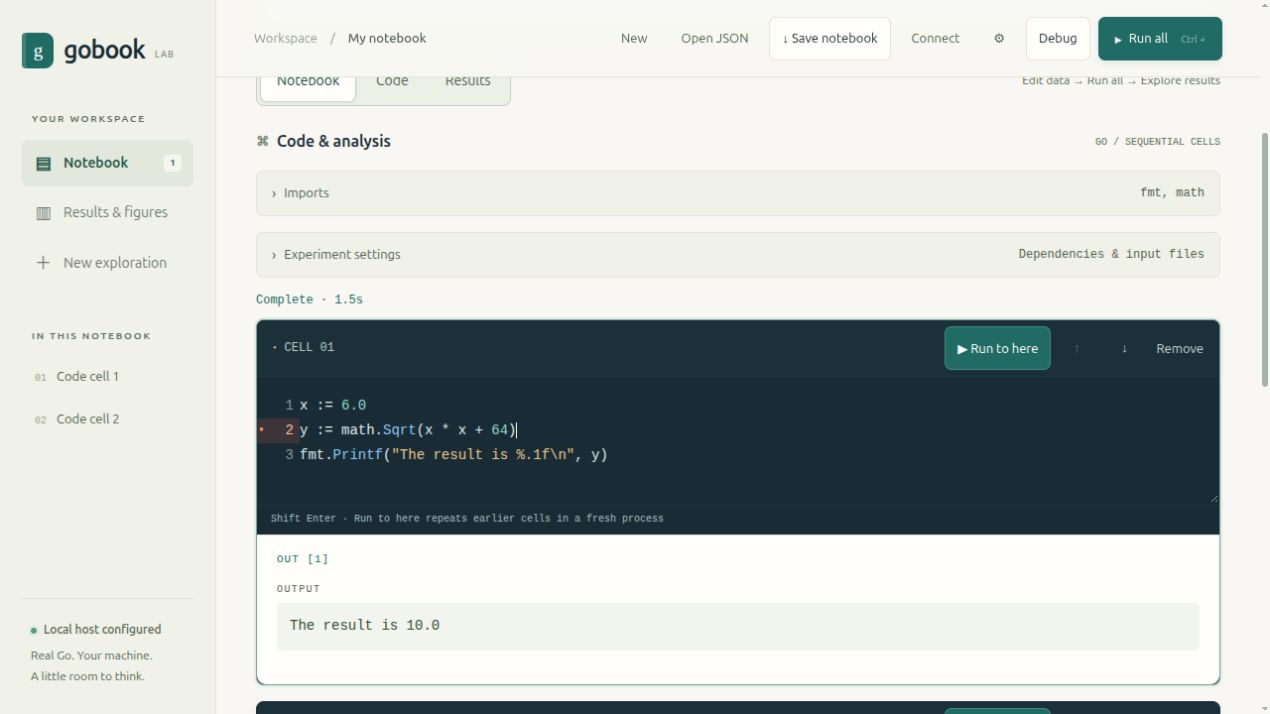
Write a cell, inspect its output, and keep going. Save notebooks and experiment results as files you control.

GoBook's local workspace with Go code cells and their output
A screenshot of the local app. This public page does not run a GoBook server.

FROM DOWNLOAD TO FIRST CELL

Make yourself
at home.

You'll need Go 1.25 or newer on PATH and a browser. No administrator account is needed for the per-user installer.

01 / GET THE APP

Choose your computer

Download the Linux x64 archive and checksum into the same folder. Verify the checksum before installing.

RUN IN YOUR TERMINAL
sha256sum -c gobook-v0.8.1-linux-amd64.tar.gz.sha256
tar -xzf gobook-v0.8.1-linux-amd64.tar.gz
cd gobook-v0.8.1-linux-amd64
./install.sh

Not sure about your processor? Linux: uname -m (x86_64 means x64; aarch64 means ARM64). Windows: Settings → System → About → System type.

02 / OPEN YOUR WORKSPACE

Launch GoBook Local

Open GoBook Local from your Linux application menu or Windows Start menu. It starts the local host and opens the authenticated workspace for you.

Prefer the terminal? With Go installed, use:

go run github.com/Alifarid0011/gobook@v0.8.1

The first run downloads and builds Go modules. Open the private URL printed in your terminal. Keep the terminal running.

03 / RUN SOMETHING SMALL

Your first answer

  1. Download the first-steps notebook.
  2. Choose Open JSON in GoBook and open the downloaded file.
  3. Keep the Interactive engine and choose Run all. You should see a total of 60 and average of 20.
  4. Change an amount, run both cells again, then choose Save notebook to keep your work.

A PLACE TO START

Bring a question.

Download a notebook, inspect its source, and open it locally. Files never run just because you open them.

01

Learn the cell workflow

Summarize three sample amounts with standard-library Go. A small first step with no third-party imports.

Interactive or NativeDownload notebook ↓
03

Start with your spreadsheet

Open CSV or Excel, filter rows, and summarize data using sheetframe's real Go engine in your browser.

Browser · no Go installationOpen sheetframe ↗

Good to know
before you run.

Where does my code run?

GoBook runs code on the computer hosting the local app, with your user permissions. Its workers are not security sandboxes. Inspect notebooks before running them. Keep the local capability URL private; it authorizes code execution. GitHub Pages serves this guide, not the app's compiler or kernel.

Which engine should I choose?

Interactive uses Yaegi and retains variables between edits, with bundled standard-library imports and interpreter language limitations. Native uses your Go compiler for versioned modules; source edits need a restart. Use Native for the Penguins notebook. Read the engine guide.

What if GoBook won't start?

Run go version in a terminal first. If Go is missing, install it and restart your terminal. For desktop setup, install again after changing your Go installation. If the default port is occupied, use the desktop troubleshooting guide. Do not post private capability URLs or host logs publicly.

How do I save and close safely?

Download your notebook before closing the page. Export experiment results if you need the outputs too. The app does not provide automatic backups. Closing the browser leaves the desktop host running; use Quit GoBook to stop the host and kernels. Quitting discards live memory.

What platforms are supported?

Release archives cover Linux and Windows, x64 and ARM64. Go 1.25+ is required on every host. macOS can use the source-based Go command, but macOS runtime behavior has not been verified locally. Mobile browsers do not include a Go compiler; running remotely needs a separately managed host.